Posts

SCCM SIte server CPU utilization 100%

Image
Today I have faced a problem which I have mentioned below: Problem : After install primary site and join to the hierarchy , few days later CPU utilization always 100 % . I have then open the task mgr from that server and sorted out the row based on Memory and found that top gangster is smsexec.exe which is getting 175 mb alltime. Solution : So after googling I have found one solution which is solve my question here is the link for Hotfix provided by MS :- KB981797

SMS_exec service missing

Image
To day I have faced a issue to install one of secondary site using push method from primary server .  After push it from primary server. I have seen in installation folder that Secondary server log folder only 4 log files are there. and the sitecomp.log file shows that below... Bootstrap failed..  After a couple of web searches I have found one solution :: which is work for me  I have run this command from command prompt  lodctr /r:c:\windows\system32\perfstringbackup.ini and then push again and after some time it will work fine for me . Help link : http://myitforum.com/cs2/blogs/jsandys/archive/2009/01/12/i-don-t-have-grey-hair-yet.aspx

SQL error 15138

Image
Today I have faced a problem which is might be help full some of buddies who is new like me ...:) I create a user in SQL db and assigned a schema dbdatareader .  But when I will try to delete the user I am facing some issue. So my work around this :  Run this query first :- USE <dbname>; SELECT s.name FROM sys.schemas s WHERE s.principal_id = USER_ID('username'); Run this 2nd query :- ALTER AUTHORIZATION ON SCHEMA::db_datareader TO dbo; Help link : http://blog.sqlauthority.com/2011/12/26/sql-server-fix-error-15138-the-database-principal-owns-a-schema-in-the-database-and-cannot-be-dropped/

System Center 2012 Configuration Manager SP1 – Don’t install it in production

Image
System Center 2012 Configuration Manager SP1 – Don’t install it in production if downloaded from MSDN or Technet, wait until General Availability. This blog is copied from  Niall C. Brady, Configuration Manager MVP. There’s been a lot of talk lately about  System Center 2012 Configuration Manager Service Pack 1  being released to MSDN and Technet and I (like a lot of people) have downloaded and installed it in my lab. The key part of that sentence above is ‘ in my lab ‘. It is  not permitted  by Microsoft to install System Center 2012 Configuration Manager SP1  in production  if you downloaded it from either of these two locations:- MSDN Technet but why ? The answer is found  here  on Microsofts’ MSDN site and it explains that you are not permitted to install this software in Production (highlighted in red below). In fact what you can also clearly see from the screenshot above  is that you are better off using...

SCCM report ID 95 not working

Image
Below mentioned SCCM reports are not working some it will gives you HTTP 500 error in IE . Count of all instances of software registered with Add or Remove Programs Count of all instances of software registered with Add or Remove Programs I have faced this issue in my IIS 7,Windows 2008 r2 ,SCCM 2007 r3 environment. Some small step i follow and it works. 1.      Open  Internet Information Services (IIS) Manager : o     If you are using Windows Server 2008 or Windows Server 2008 R2: §   On the taskbar, click  Start , point to  Administrative Tools , and then click  Internet Information Services (IIS) Manager . o     If you are using Windows Vista or Windows 7: §   On the taskbar, click  Start , and then click  Control Panel . §   Double-click  Administrative Tools , and then double-click  Internet Information Services (IIS) Manager . 2.    ...

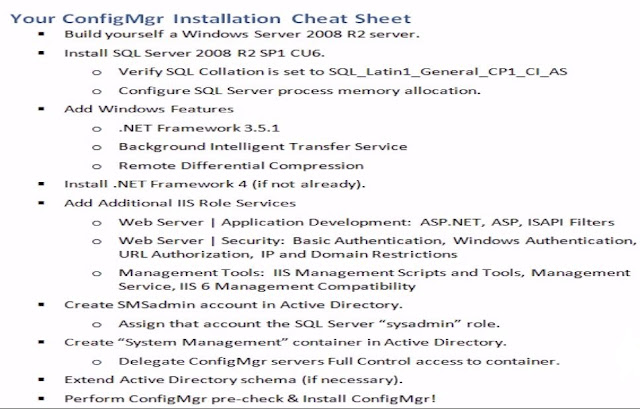
SCCM 2012 Installation cheat sheet

Image

The compressed files for package XXX00001 hasn’t arrived from site...

Today I am facing a issue that sms_distribution_manager always stating that  The compressed files for package XXX00001 hasn’t arrived from site 0GL yet, will retry later. Sent package server list to parent site XXX for package XXX00001 StoredPkgVersion (4) of package XXX00001. StoredPkgVersion in database is X. SourceVersion (4) of package XXX00001. SourceVersion in database is X. but in smspkgX$ folder nothing process the package. Below mentioned process I follow and get success.. Ensure the PCK file for the package has been copied across to the SMSPKG folder. If not, copy across manually (from another site) and then run PreloadPkgOnSite tool again for that package. If it returns successful then it will normally begin to uncompress. If it doesn’t, go to %ConfigMgrInstall%\inboxes\distmgr.box and delete the PKG file that matched the package ID You now need to edit the SCCM DB (***DISCLAIMER***: Do not touch the DB unless you have a full SCCM backup and are ...

DTC access In win 2003

Enable network DTC access in Windows Server 2003 To day I have faced a issue with my SCCM server that DTC not started . My Environment : Windows 2003 server with SP2 SCCM R3 Secondary site Work around : Steps to enable network DTC access Click Start , point to Control Panel , and then click Add or Remove Programs . Click Add/Remove Windows Components . Select Application Server , and then click Details . Select Enable network DTC access , and then click OK . Click Next . Click Finish . If you are running Windows Server 2003 Service Pack 1 (SP1), you must follow these additional steps: Click Start , click Run , type comexp.msc , and then click OK to open Component Services. Expand Component Services , expand Computers , right-click My Computer , and then click Properties . On the MSDTC tab, click Secuity Configuration under Transaction Configuration , click to select the Network DTC Access check box under Secuity Settings , and then click ...
Comparing SMS2003, SCCM 2007 and SCCM 2012 I started listing down comparative differences between SMS 2003, SCCM 2007 and SCCM 2012 and with the help of Wei King to finish off the list, here is what we came up with... Features SMS2003 SCCM2007 SCCM 2012 Hardware & Software Inventory ü ü ü Automatic Client Health Remediation ü Software Distribution ü ü ü Computer based targeting ü ü ü User based targeting ü *P ü State-based Application Distribution ü Self-service portal ü App-V Package Deployment ü ü Xen-App Package Deployment ü Uninstallation via Software Center ü User-Device Affinity ü Distribution Poin...